Overwatch | A Garmin Watch Face With 5 Layouts on Auto
Most data faces give you one fixed screen and ask you to live with it. Overwatch carries five screens tuned for five different parts of your day, and in Auto mode it switches between them by itself.
Short version: start a run and it becomes a running dashboard, and during your sleep window it goes dark and quiet — no switching required.
Overwatch
Five data layouts in one watch face — and it knows which one you need.
⌚ View on Garmin Connect IQWho is this for?
- Anyone who mixes running, hiking and other activities
- Anyone tired of manually switching watch face settings for each activity
- Anyone who wants Always-On without sacrificing battery life or legibility
- Anyone who wants to match the accent colour to their mood (4 options)
The five layouts
| Layout | What it shows |
|---|---|
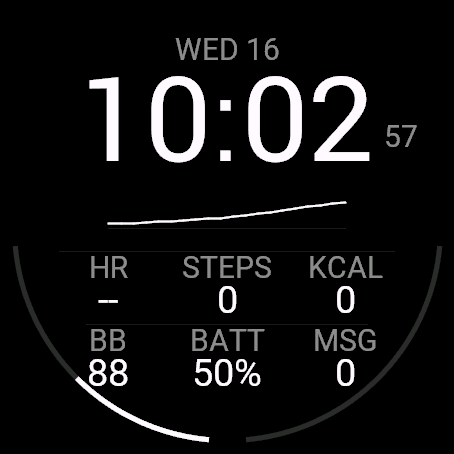
| Cockpit — everything at once | Big time, your Body Battery trend for the last hour, and six fields: heart rate, steps, calories, Body Battery, watch battery and notifications. Twin edge gauges (watch battery / step goal) |
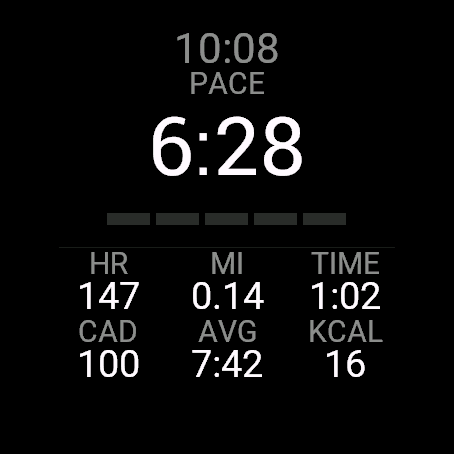
| Track — while you run | Big live pace, heart rate, distance, elapsed time, cadence, average pace and calories, all in one screen while recording an activity |
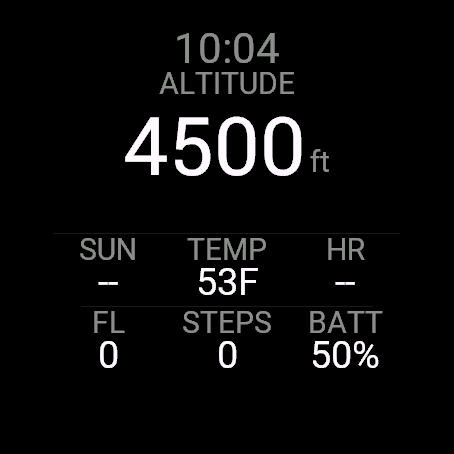
| Trail — while you climb | Big altitude, time left until sunset, temperature, heart rate, floors climbed, steps and battery |
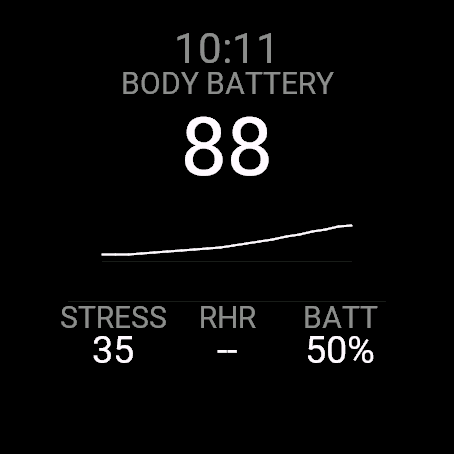
| Recovery — the morning after | Big Body Battery with its last hour as a trend line, plus stress, resting heart rate and battery |
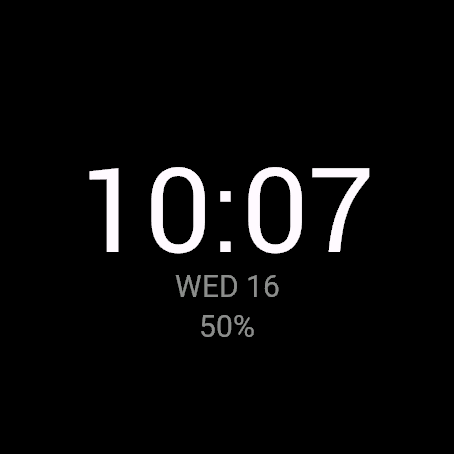
| Night — calm and dark | Time only, at the largest size the screen can draw, with date and battery underneath. Built for sleep and Always-On |
Key features
| Feature | What it does |
|---|---|
| Auto mode (default) | Switches between the five layouts based on activity type and time of day |
| Built to be read | The largest number font each watch can render; units follow your watch settings (km/mi, etc.) |
| Accent colour | Choose white, green, amber or cyan |
| Always-On support | Drops to a dimmed time-only readout in low-power mode and nudges by one pixel every minute to prevent burn-in |
Compatible watches
47 AMOLED Garmin watches: Forerunner 70 / 165 / 165 Music / 170 / 170 Music / 265 / 265S / 570 (42 / 47 mm) / 965 / 970, Venu 2 / 2 Plus / 2S / 3 / 3S / 4 (41 / 45 mm), vívoactive 5 / 6, fēnix 8 AMOLED (43 / 47 / 51 mm) / fēnix 8 Pro (47 / 51 mm) / fēnix E / fēnix 9 (43 / 47 mm) / fēnix 9 Pro (43 / 47 / 51 mm), epix (Gen 2) / epix Pro (Gen 2) (42 / 47 / 51 mm), Instinct 3 AMOLED (45 / 50 mm), MARQ (Gen 2), Approach S50 / S70 (42 / 47 mm), Descent G2 / Mk3 (43 / 51 mm), D2 Air X10 / Mach 1 / Mach 2 / Mach 2 Pro (including tactix 8, quatix 8 and other models on the same platforms)
Price and how to buy
Everything is free to use for 24 hours after you install it. When the trial ends, a single one-time unlock (US$3.99, no subscription) keeps all features working.
How to buy: once the trial is over, the face shows a 6-digit code and the URL www.kzl.io/code. Open that URL on your phone, enter the code and pay, and the watch face unlocks automatically within a few minutes. Payment is processed by KiezelPay, not Garmin (credit card or PayPal). Once unlocked, other supported watches on the same Garmin account don't need a second purchase.
FAQ
Q. Is Overwatch free to use?
A. Everything is free for 24 hours after you install it. After the trial, a single US$3.99 one-time unlock keeps all features working. There is no subscription.
Q. What is Auto mode?
A. Auto mode switches the layout to fit the moment: Track while running, Trail while hiking, Night during your sleep window, Recovery in the hours after you wake, and Cockpit the rest of the time. You can also pin one layout and stay there.
Q. Where does the payment go?
A. Payment is processed by the third-party service KiezelPay, not Garmin directly. When the trial ends, the face shows a 6-digit code and a URL — open it on your phone, enter the code and pay (credit card or PayPal).
Q. Which watches are supported?
A. 47 AMOLED Garmin watches, including Forerunner 165 / 265 / 570 / 965 / 970, Venu 2 / 3 / 4, vívoactive 5 / 6, fēnix 8 / 8 Pro / E / 9, epix (Gen 2) and epix Pro, Instinct 3 AMOLED, MARQ (Gen 2), Approach S50 / S70, Descent G2 / Mk3 and D2. See the Compatible watches section for the full list.
Q. Does it affect battery life?
A. In the watch's low-power state, Overwatch drops to a dimmed time-only readout and nudges itself by one pixel every minute, protecting both battery life and AMOLED screens from burn-in.
Stop switching, start wearing
Try it free for 24 hours and see how it looks on your own watch. Like it? Unlock it with a single one-time payment.
⌚ View on Garmin Connect IQ