Using an RTX 5060 Ti: Custom Desktop or External GPU (eGPU)?
My everyday setup is a laptop connected to an external GPU (eGPU). The same GeForce RTX 5060 Ti can also go straight into a desktop. Which one is right for you comes down almost entirely to one question: do you carry your computer around? This article puts the two setups side by side.
In short: if your computer never leaves the desk, build a desktop. If you use a laptop on the go and want more power when you get home, an eGPU is the better fit.
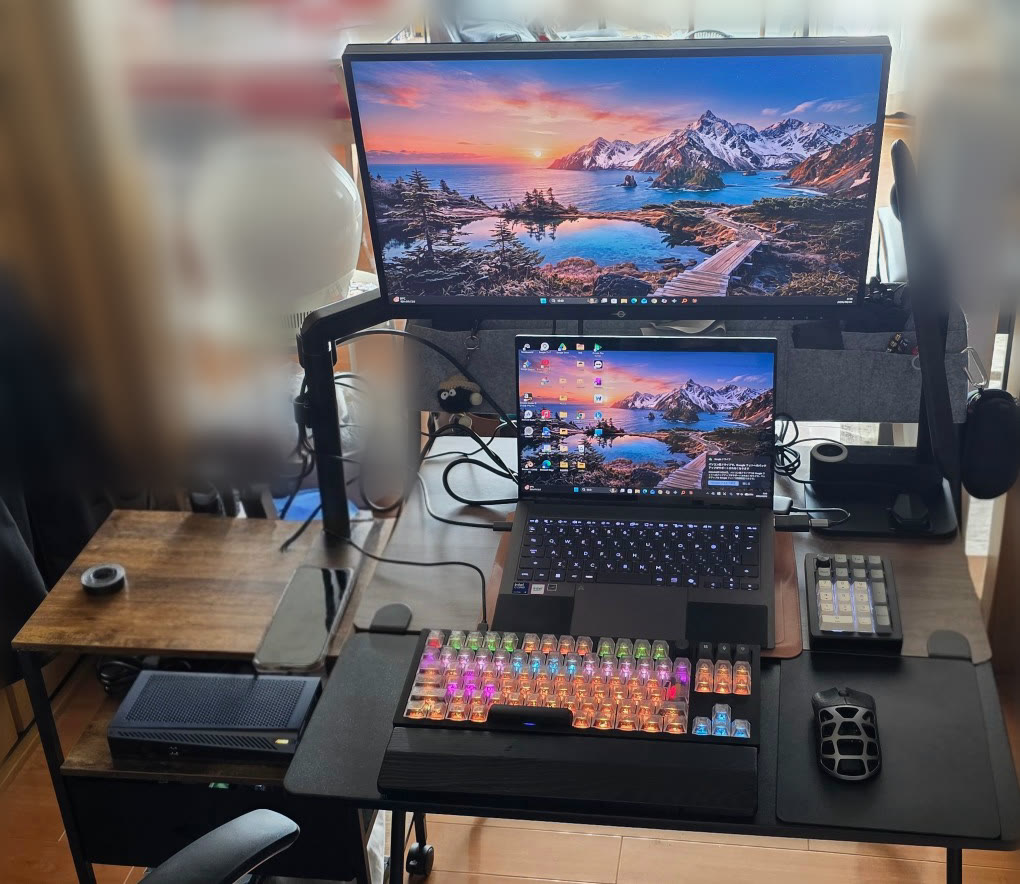
The setups at a glance
| Part | Product | Price guide (Japan) | Link |
|---|---|---|---|
| Graphics card (for a desktop) | ASUS Dual GeForce RTX 5060 Ti 16GB GDDR7 OC Edition (DUAL-RTX5060TI-O16G) | About ¥143,600 (Kakaku.com) | Search on Amazon |
| External GPU (eGPU) | GIGABYTE AORUS RTX 5060 Ti AI BOX (GV-N506TIXEB-16GD) | About ¥205,000 (Kakaku.com) | View on Amazon |
| Laptop paired with the eGPU (my own) | ASUS Zenbook (Core Ultra 9 386H) | About ¥344,800 (Amazon; temporarily out of stock as of October 1, 2026) | View on Amazon |
If you build a desktop, you'll also need a CPU, motherboard, memory, SSD, power supply and case on top of the graphics card. As of October 2026 memory and graphics cards are expensive in Japan, and the total cost of a full system varies a lot, so check current prices when you choose parts.
* Prices are Japanese retail guides as of October 1, 2026 (lowest price on Kakaku.com, or the linked shop's price for products not listed there). Prices and stock change daily, so check the latest details at each link before buying.
Custom desktop vs. eGPU
| Point of comparison | Custom desktop + RTX 5060 Ti | Laptop + eGPU (AORUS RTX 5060 Ti AI BOX) |
|---|---|---|
| How the GPU connects | Directly to a PCIe slot on the motherboard | Over a Thunderbolt 5 cable |
| Performance with the same GPU | Few bandwidth limits, so it's easier to get the GPU's full performance | Connection bandwidth is limited, so the same GPU may perform below a desktop |
| Portability | None | You can take just the laptop with you |
| Desk space | Room for a mid-tower case | The box is about 117 × 243 × 45 mm (manufacturer's figure) |
| Connecting peripherals | Each cable connects separately | The box doubles as a hub, so one cable connects displays and USB devices |
| Charging the laptop | — | Up to 100 W over Thunderbolt 5 (manufacturer's figure) |
| Future upgrades | GPU, CPU and memory can each be replaced | Upgrading the GPU means replacing the whole box |
| Upfront cost (guide as of October 1, 2026) | About ¥143,600 for the graphics card alone (other parts extra) | About ¥205,000 for the box (laptop extra) |
Which should you choose?
A custom desktop suits you if…
…your computer stays on the desk. With the GPU plugged in directly, it's easier to get its full performance, and you can upgrade the CPU, memory and storage separately later. For the same budget, a desktop tends to give you more performance per yen.
An eGPU suits you if…
…you want a light laptop when you're out and heavy work or gaming at home. The AORUS RTX 5060 Ti AI BOX connects over Thunderbolt 5 and also charges the laptop (up to 100 W), drives displays and works as a USB hub, so plugging in one cable when you get home switches your whole workspace over. I describe how I use it in A Laptop + eGPU Setup for the Ultimate Space-Saving Desk.
What to check before buying an eGPU
The performance you get depends on whether your laptop has a Thunderbolt 5 (or compatible) port. Always check your laptop's port specification before buying.
Cheaper alternatives
| Part to change | Alternative | Keep in mind |
|---|---|---|
| Desktop GPU | GeForce RTX 5060 (8GB) | Half the video memory, so you'll lower settings more often at high quality |
| eGPU | Reuse the laptop you already have | If your current laptop supports Thunderbolt, the only cost is the box |
Higher-end alternatives
| Part to change | Alternative | Why |
|---|---|---|
| Desktop GPU | GeForce RTX 5070 | For high frame rates at WQHD |
| eGPU | An eGPU box with a higher-end GPU | Bandwidth limits remain, and the gap tends to grow with faster GPUs |
Notes on building and maintenance
- Always switch the power off before plugging or unplugging graphics card or eGPU cables. I once broke hardware by plugging in a graphics card's power cable while the system was live (the story is here).
- When gaming on an eGPU, turn off the laptop's own screen and show the game only on the external display, so the system can focus on the game.
- An eGPU box has fans inside and collects dust too. Clean its air intakes regularly, just as you would a desktop.
I cover how to think about part choices and how to maintain a PC for the long run in my Kindle books (written in Japanese).
- The Golden Ratio PC Build Bible [2026 Edition] (Kindle) / About the book
- Double Your PC's Lifespan: Maintenance & Troubleshooting (Kindle) / About the book