A Complete Home-Office Desk Setup | Choosing a Keyboard, Monitor, Mouse and Numpad
Working from home, you spend most of the day at the same desk with the same keyboard and mouse. The input devices and screens your hands and eyes touch every day affect how tired you get far more than the computer's specs do. Here is a complete home-office desk setup, based on the gear I actually use.
In short: the most effective way to set up a home-office desk is to start with three things — a mouse and keyboard that fit your hands, an external monitor you can place at eye level, and a wrist rest to support your wrists.
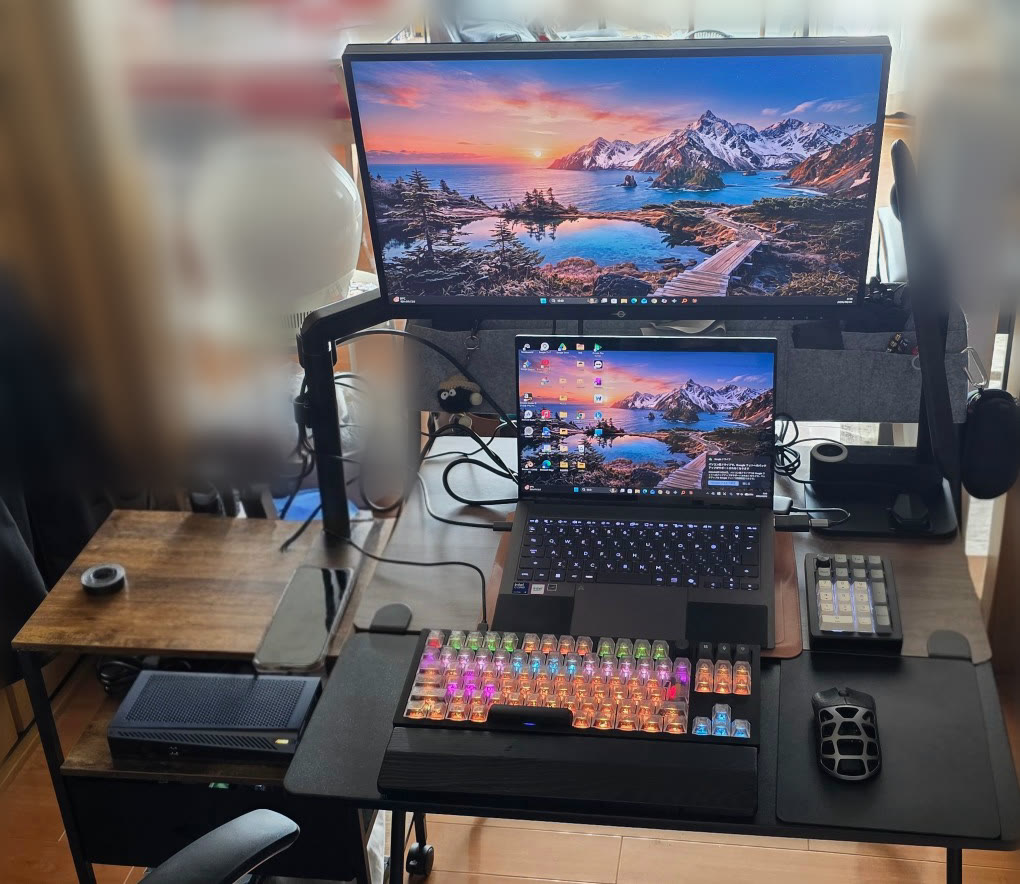
The setup at a glance
| Part | Product | Price guide (Japan) | Link |
|---|---|---|---|
| Keyboard | Keychron Q3 Ultra 8K | About ¥39,930 (Kakaku.com) | View on Amazon |
| Silent switches (swap-in) | Outemu Silent Peach V3 | About ¥3,399 (pack of 70, Amazon) | View on Amazon |
| Numpad | EPOMAKER EK21 VIA | About ¥7,620 (Amazon) | View on Amazon |
| Mouse (desk) | ATK FIERCE X | About ¥14,200 (Kakaku.com) | View on Amazon |
| Mouse (portable) | Logitech MX ANYWHERE 3S | About ¥12,980 (Graphite, Kakaku.com) | View on Amazon |
| Main monitor | Titan Army P245MS+ (24.5" WQHD) — discontinued. Its successor is the Titan Army P245MS PRO (24" WQHD) | P245MS+ no longer found at retailers. P245MS PRO about ¥52,800 (Amazon) | View the successor on Amazon |
| Second monitor (portable) | EVICIV 17.3" portable monitor | About ¥19,999 (Rakuten Ichiba) | View on Rakuten |
| Desk extender | Sanwa Direct folding clamp-on desk extender | About ¥6,980 (Amazon) | View on Amazon |
| Wrist rest | Faluber lacquered wooden wrist rest (black) | About ¥4,400 (Amazon) | View on Amazon |
Approximate total: about ¥162,300 (with the P245MS PRO as the main monitor; about ¥109,500 without monitors)
* Prices are Japanese retail guides as of October 1, 2026 (lowest price on Kakaku.com, or the linked shop's price for products not listed there). Prices and stock change daily, so check the latest details at each link before buying.
Why I chose each item
Keyboard: Keychron Q3 Ultra 8K
A tenkeyless mechanical keyboard. I swapped in silent switches so the typing noise doesn't bother anyone even late at night (the swap, step by step).
Numpad: EPOMAKER EK21 VIA
The keyboard itself is tenkeyless, and the numpad sits beside it only when I need to enter numbers. That keeps the mouse close to my body, so my shoulders don't open up too far and I tire less.
Mice: ATK FIERCE X and MX ANYWHERE 3S
With mice, fit matters more than specs. My hands are small and I use a claw grip, so I use the ATK FIERCE X at the desk and the MX ANYWHERE 3S on the go (how I choose).
Monitors: Titan Army P245MS+ and EVICIV portable monitor
A 24.5" WQHD monitor as the main screen and a portable monitor as the second makes a two-screen setup. Writing while reading reference material, or keeping a meeting window open to the side, gets much easier when working from home.
Desk extender and wrist rest
A desk extender adds depth without replacing the desk, and a wooden wrist rest supports the wrists. Together they reduce the strain of long typing sessions.
Cheaper alternatives
| Part to change | Alternative | Keep in mind |
|---|---|---|
| Keyboard | A membrane or scissor-switch keyboard with silent switches | Quiet typing without swapping switches. Try the feel in person if you can |
| Monitor | A single 24" Full HD monitor | Start with one. Using the laptop screen as the second gives you two screens |
| Numpad | None (use a full-size keyboard) | If you rarely enter numbers, there's no need for a separate numpad |
Higher-end alternatives
| Part to change | Alternative | Why |
|---|---|---|
| Monitor | A 27" WQHD to 4K monitor | For text-heavy work, a bigger, sharper screen shows more at once |
| Accessory | A monitor arm | Makes it easier to set the monitor at eye level and frees up desk space |
| Accessory | A Thunderbolt / USB-C dock | With a laptop, one cable connects all your peripherals |
Notes on setup and maintenance
- Placing the top of the monitor at or slightly below eye level makes your neck and shoulders tire less.
- Even with silent switches, the sound depends on how you type. If noise matters where you work, a desk mat cuts the echo.
- More cables mean more dust. Clean under the desk and around the computer regularly.
I cover how to think about part choices and how to keep equipment running for the long run in my Kindle books (written in Japanese).
- The Golden Ratio PC Build Bible [2026 Edition] (Kindle) / About the book
- No More Leasing: Cost-Cutting Bible for Startups (Kindle) / About the book