Rakuraku Step Counter | No-Button Pedometer for Seniors
Tried a step-counting app before and gave up because it was too fiddly? Rakuraku Step Counter ("easy step counter") tracks your steps automatically with no buttons to press — built to be easy for seniors to use. Step banking never punishes a short day, and Share with Family lets you report today's walk to family in one tap.
In short: install it, grant one permission, and from then on your steps are tracked automatically just by carrying your phone. Extra steps bank up over time, and a family member can hear about it with a single tap.

Rakuraku Step Counter
No buttons to press — automatic step tracking designed to be easy for seniors. Works well for the user themselves, and just as well for a family member setting it up on their behalf.
📲 Free DownloadWho is this for?
This app is a good fit if:
- You've tried a step-counter app before, but the controls felt too fiddly to stick with
- You want steps tracked automatically, without opening the app
- You want to check today's steps at a glance from the home screen
- You want a little extra motivation to keep walking
- You're a family member who wants to set up step tracking for a parent or grandparent who lives elsewhere
Key features
| Feature | What it does |
|---|---|
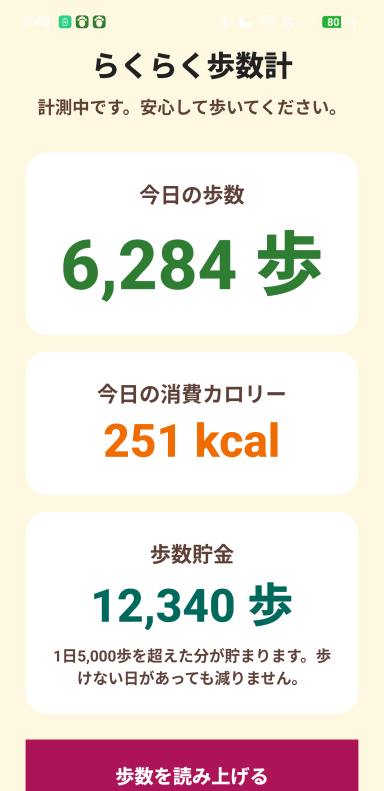
| Automatic Step Counting | Tracks your steps in the background — no need to even open the app |
| Home-Screen Widget | Shows today's steps and calories in large, easy-to-read text, resizable to fit your screen |
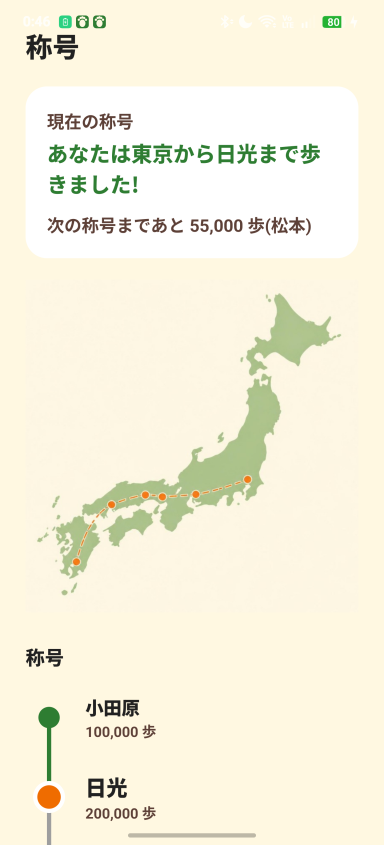
| Rank System + Journey Map | Your rank climbs every 100,000 steps, and the rank screen now shows a route map of the journey (Chinese and Taiwanese editions follow a locally relevant route) |
| Daily Goal Alerts | Get notified on hitting 3,000 / 5,000 / 8,000 / 10,000 / 15,000 steps in a day |
| Step Banking | Steps over a 5,000/day baseline are banked; a short day never pushes the balance below zero |
| Voice Readout | Have today's step total read aloud, no need to look at the screen |
| Peer Comparison | Compares your 7-day average against national averages by age group |
| Share with Family | Send today's steps, calories and current rank to family in one tap, via LINE, email, or any messaging app |
How it works
After installing, just grant the one permission needed for step tracking (physical activity) and you're set up. From there, steps are counted automatically as you carry your phone around. Add the widget to your home screen and today's step count is visible at a glance, no app-opening required.
FAQ
Q. Is Rakuraku Step Counter free to use?
A. Yes. You can download it for free from Google Play.
Q. Do I need to open the app every day for it to track steps?
A. No. It tracks your steps automatically in the background, even without opening the app.
Q. Can I check my steps from the home screen?
A. Yes. A home-screen widget shows today's steps and calories in large text, and the size is adjustable.
Q. Are there features that make it easier to stick with?
A. Yes — a rank system that climbs with the distance you've walked, and notifications when you hit your daily step goal.
Q. Can I set this up on a parent's or grandparent's phone for them?
A. Yes. Tracking starts automatically after granting one permission, so it's easy for family members to set up on someone else's behalf.
Q. What is step banking?
A. Steps you walk beyond a 5,000-steps-a-day baseline are banked as a running surplus. A short day never pushes the balance below zero, so one off day doesn't feel like losing a streak.
Q. Can I let family know how many steps I walked today?
A. Yes. The Share with Family button prepares a message with today's steps, calories and current rank, then hands it to your phone's own share sheet — LINE, email, or whatever app you choose. You always decide whether to actually send it.
Q. Can I compare my steps to people my age?
A. Yes. The peer-comparison screen shows your own 7-day average against national averages by age group. You choose your age group yourself, and can change it later.
Want an easy way to stick with walking?
No fiddly controls — just carry your phone. Works whether you set it up yourself or a family member sets it up for you.
📲 Free Download