Mamori Note | Notes, Handwriting & Password Vault App
Mamori Note (まもりノート in Japanese) is a note app for organizing notes, checklists, photos and handwriting in nested folders. With Pro, you can also use a vault for IDs and passwords, locked folders that you can lock one by one, sync and backup using your own Google Drive or iCloud, and a just-in-case handover that lets you choose notes to pass on to your family. There are no ads.
In short, the developer runs no servers: your data is kept only on your devices and in your own Google Drive or iCloud.
Mamori Note
A note app that brings together notes, photos, handwriting and a password vault (Pro), with no ads.
View on Microsoft Store (Windows)* Free to download. Pro is an in-app purchase (one-time or yearly subscription); purchasing it in the Windows version is in preparation. The Android and iPhone/iPad versions are also in preparation.
Who is this for?
This app may suit you if you:
- want to organize notes, photos and handwriting in folders inside folders
- like to write notes by hand with a pen (with a pressure-sensitive pen, the line width changes with pressure)
- want to keep your IDs and passwords in the same app as your notes (the vault is Pro)
- want your data on your own devices and in your own Google Drive or iCloud, not on the developer's servers
- want to choose and gather notes and passwords to pass on to your family in an emergency (creating a handover is Pro)
- prefer larger text and buttons (Easy view)
Key features
| Feature | What it does |
|---|---|
| Notes and checklists | Text notes and checklists you can tick off. Pin the notes you use often |
| Nested folders | Create folders inside folders to organize your notes in layers |
| Photos and handwriting | Attach photos to notes, and write on handwriting pages with a pen, marker or eraser. With a pressure-sensitive pen, the line width changes with pressure |
| Search | Find notes by words in their title, body and checklist items |
| Search text in photos and handwriting (Pro) | Text in photos and handwriting is recognized on your device and added to search. It is off at first and works once you turn it on in Settings |
| Trash | Deleted notes and folders can be restored for 30 days |
| Password vault (Pro) | Store IDs, passwords, URLs and notes, encrypted on your device. It can also generate passwords. Open it with Face ID, a fingerprint or a PIN on iPhone, iPad and Android, and with Windows Hello or a long passphrase on Windows |
| Locked folders | Lock individual folders to keep the notes, photos and handwriting inside encrypted on your device. Locking a folder and editing inside it are Pro; opening and unlocking are free |
| Sync and backup (Pro) | Sync with your own Google Drive (all four device types) or iCloud (iPhone and iPad only). Daily backup versions are kept, up to 17 |
| PDF export (Pro) | Export a single note, or a whole folder as one PDF with a table of contents |
| Just-in-case handover | Choose notes and vault items for your family, and make a handover sheet (print or PDF) and a passphrase-encrypted file (creating one is Pro). Viewing and printing a file you received is free |
| Export and import | Export your data into one passphrase-encrypted file (.mamori) and import it on another device. Exporting is free; importing locked contents and vault items is Pro |
| Easy view | Larger text and buttons, with fewer controls |
| Stickers and covers | Sai & Jino stickers and cover themes for folders: 8 stickers and 3 covers for free, 40 stickers and 9 covers with Pro |
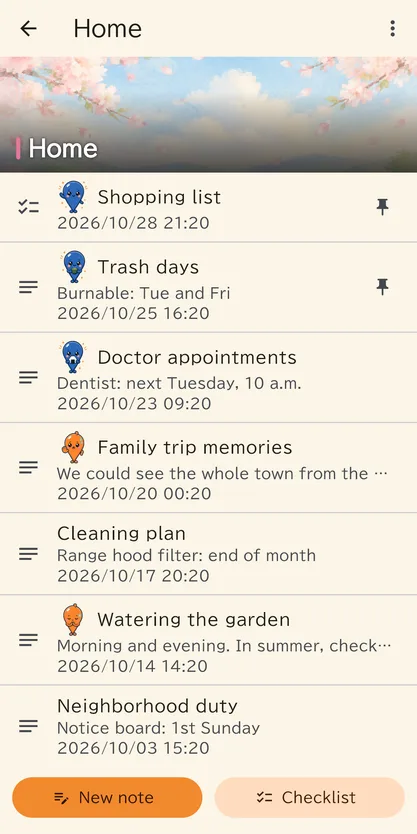
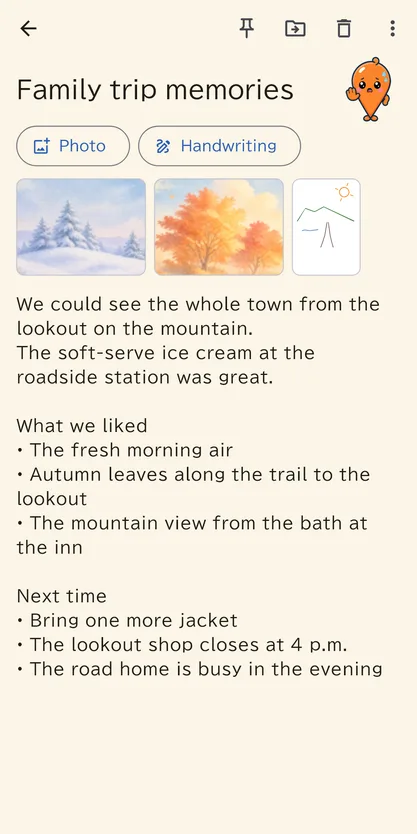
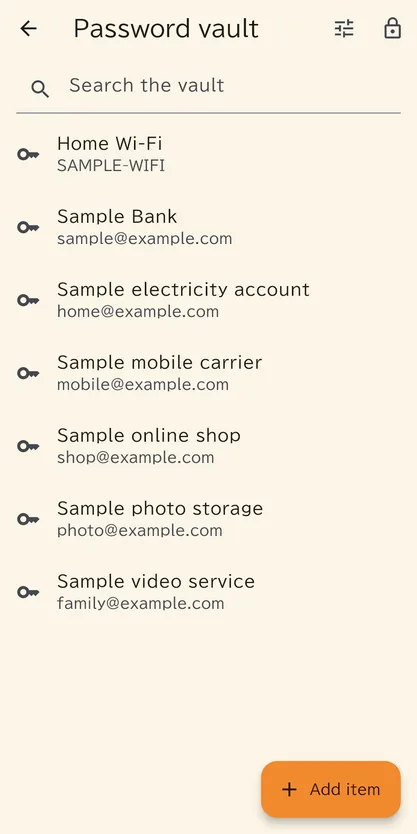
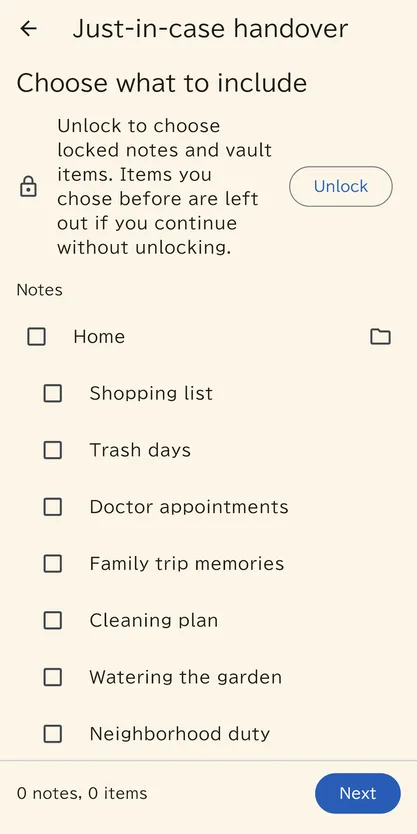
* Screens from the Android version, with sample data.
Our approach to privacy
- The developer runs no servers. Your data is kept only on your devices and in your own Google Drive or iCloud.
- The app does not send your notes, photos, passwords or purchase information to the developer. There is no account to register with the developer, and there are no ads.
- Data placed in the cloud is encrypted on your device before it is sent, designed so that the developer, Google and Apple cannot read it.
- The contents of the vault and locked folders are encrypted on your device as well.
- Google Drive is used with a permission that only covers files the app created, so the app cannot see your other Drive files.
- Text in photos and handwriting is recognized on your device on every platform.
- On Android, Google components send information to Google: the Google Play purchase component sends diagnostic logs each time the app starts, and if you turn on text search in photos and handwriting, ML Kit sends usage statistics (your photos, handwriting and recognized text are not sent).
- Cloud data will no longer be kept if you delete the folder or its files, or end your Google Drive or iCloud plan. The developer does not hold copies of your data, so it cannot restore it for you.
For details, see the Mamori Note privacy policy.
About the recovery key
The app creates a recovery key the first time you use the vault or sync. You use it to start syncing on a second or later device, and in an emergency. Print it or save it as a PDF, and keep it safe. The developer does not have your recovery key. If you lose both the printed key and all your devices, no one, including the developer, can open your data.
How it works
Once you install the app, you can start making notes, checklists, photos and handwriting right away and organize them in folders. To use sync with Pro, choose Google Drive or iCloud as the destination (one per device). A recovery key is created the first time you use the vault or sync, so print it and keep it safe. On a second device, use the recovery key to start syncing.
* The app icon and the Sai & Jino illustrations, such as the stickers and covers, are based on images made with AI (Canva AI).
FAQ
Q. Is it free?
A. It is free to download. Notes, folders, checklists, photos, handwriting, search, Easy view and export are free. The password vault, sync and backup, PDF export, creating a handover and some other features are Pro (an in-app purchase: one-time or yearly subscription). There are no ads.
Q. What happens to my data if Pro ends?
A. Your notes, photos and passwords stay as they are. You can still view, copy and unlock the vault and locked folders, and restore from backup versions. Sync and automatic backups stop.
Q. Can the developer see my notes or passwords?
A. The developer runs no servers, and the app does not send your notes, photos or passwords to the developer. Data placed in the cloud is encrypted on your device before it is sent, designed so that the developer, Google and Apple cannot read it.
Q. What if I lose my recovery key?
A. The developer does not have your recovery key, so if you lose both the printed key and all your devices, no one can open your data. If someone has seen the printed key, or you have lost a device, you can create a new recovery key.
Q. Can I use it on iPhone or Android?
A. Mamori Note is an app for iPhone, iPad, Android and Windows. The Windows version is now available on the Microsoft Store. The Android and iPhone/iPad versions are in preparation.
Q. Can I use Pro bought on one device on my other devices?
A. Yes, on devices connected with the same recovery key and syncing to the same destination (Google Drive or iCloud), Pro bought on any one of them can be used on the others.
Your notes and passwords, on your devices and in your own cloud
Mamori Note keeps your data off the developer's servers, only on your devices and in your own Google Drive or iCloud.
View on Microsoft Store (Windows)* Free to download. Pro is an in-app purchase (one-time or yearly subscription); purchasing it in the Windows version is in preparation. The Android and iPhone/iPad versions are also in preparation.
Questions and bug reports
For questions, bug reports or suggestions about this product, please use the contact form. The button below opens the form with the product name filled in. What to include in a bug report is listed on the contact page.
Open the contact form